Six new categories have been opened up for you to sell in on your WebStore. These are:
1) Jewelry
2) Watches
3) Apparel
4) Gourmet
5) Personal Computers
6) Industrial & Scientific
To start selling in these categories, simply log into Seller Central and select the WebStore Design tab. Here a new message appears in the lower right hand corner:
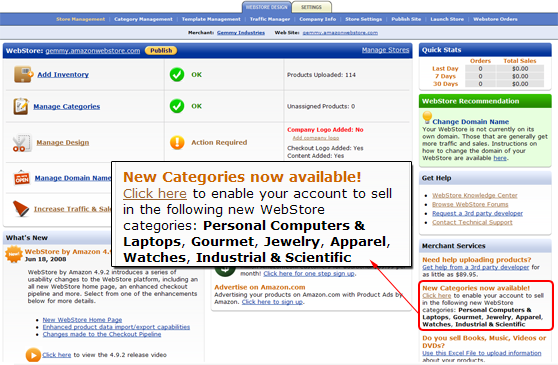
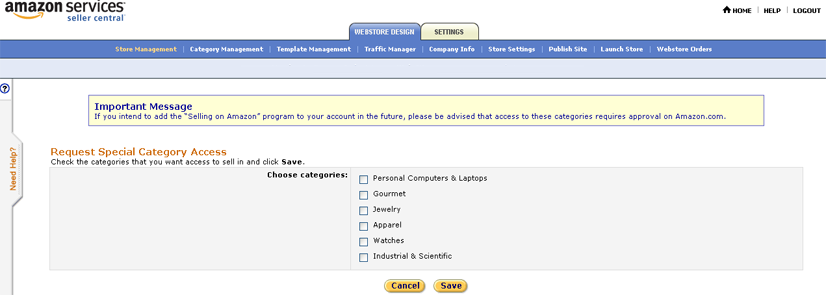
By selecting the Click here option (See above), WebStore will take you to the screen that allows you to select and enable the categories you wish to sell in (See below). Select those categories and click Save.
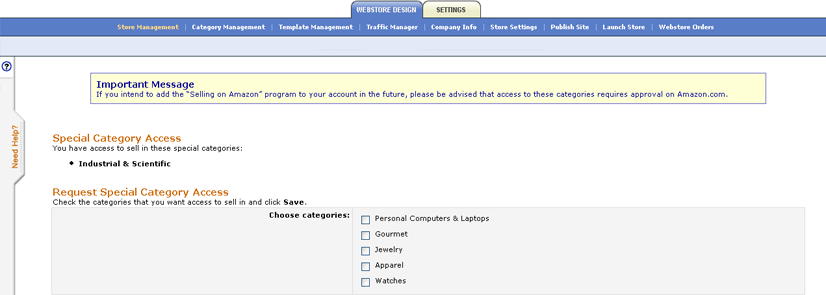
Once you have selected your categories and return to this screen you will see your selected categories appear in a new list and unselected categories appears in the check box list (see below).
Once your account is enabled, you will be able to list products in these categories using Add Inventory and through product feeds.
 |
Important Notes: If you are currently enrolled in our Selling on Amazon program with this account, selling in these categories require explicit approval from Amazon.com and will not be available to you unless you have the requisite approval.
The approval process also applies if you are enabled for any of these categories on WebStore and wish to enroll in our Selling on Amazon program with this account.
|
 |
More Information can be found in the WebStore Knowledge Center by visiting the following pages:
|
|
