This enhancement enables merchants to integrate the Omniture Web Analytics package with their WebStore. This analytics suite provides a series of general analytics features as well as some advanced features such as Site Analysis, Merchandising Analysis, Marketing Analysis, Campaign Analysis and Pricing Analysis.
Integrating Omniture
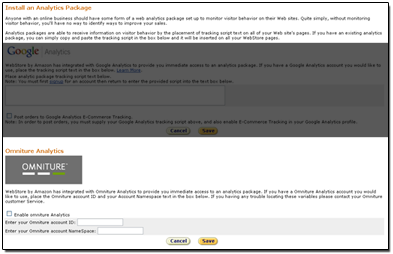
To integrate Omniture with your WebStore, you must set up an account with Omniture. Once this is completed, simply navigate to the Traffic Manager, select Add a Web Analytics Package and enter your Omniture account Information. Once you republish your store, your tracking will begin.
Sample Reports
A large series of reports are available within the Omniture suite. Below are a couple of sample reports that can be generated.
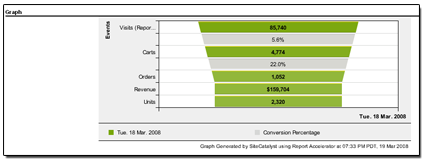
The first report is the Purchase Conversion and Average report. This graph shows the following data for a selected time range:
1. Amount of visits to the site.
2. Items added to the cart.
3. Actual number of orders.
4. Actual sales revenue.
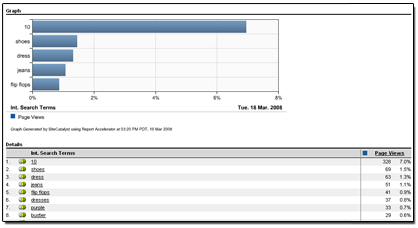
The next report shows a list of Top Search Terms used on the storefront. This report displays the search terms and number of page visits per search term. Information is presented in data and graph form.
|
Click here to view a short video about this feature. |
|

)
)
)

)
)
)

)
)
)
)