|
In This Issue
|
 |
|
|
|
Latest Product Enhancements
New Categories Have Launched! Pets, Musical Instruments, and Grocery
On June 6, 2011, we launched three new categories for product ads - Pet Supplies, Musical Instruments, and Grocery. If you have selection in the Musical Instruments and Pet Supplies categories, you can add these products to your feed today. In order to advertise products in the Grocery category, you will first need to submit a Seller Support case request (login required): Problem type: Product Listings > Permission to list new products. If you are new to Product Ads and do not have a Seller Central login, you can request approval on AmazonServices.com.
Once you have uploaded the new selection to your feed, don’t forget to review your bids (login required) in the new categories to ensure optimal ad placement on Amazon.com.
Grocery and Gourmet Advertising Requirements
To advertise your Grocery and Gourmet products on Amazon.com, you must first request permission from Amazon. Listed below are some of the minimum requirements for advertising your Grocery and Gourmet products:
- Attributes - You must provide UPC, Brand or Manufacturer attributes for all products in your feed.
- Product Quality - Products must be new, authentic and meet North America product safety standards.
- Product Listings - Your product data (including images) must meet Amazon.com guidelines.
If you are able to meet all of the above requirements and wish to list your products in Grocery and Gourmet, please submit a Seller Support case request (login required): Problem type: Product Listings > Permission to list new products. If you are new to Product Ads and do not have a Seller Central login, you can request approval on AmazonServices.com.
 Optimize Your Ads
Pricing Changes on June 1, 2011 - Review CPC Bids and Traffic
On June 1, 2011, Amazon adjusted the minimum bid amount in 36 bidding categories. If you chose to opt out of the new minimum bids, you may have experienced a decrease in ad traffic if your bids are lower than the minimum required for your ads to appear on Amazon.com.
We recommend that you review your bids (login required) and modify any bids that are below the new minimums. Increasing your bid above the minimum may help you get additional exposure for your ads on Amazon. We suggest that you set your CPC bid to the highest amount that you are willing to pay for a click in order to maximize your traffic potential.
News and Announcements
Advertiser Spotlight on US-Mattress.com
This month, we interviewed Brenda Smith from the Web Marketing group at US-Mattress.com to learn about how Amazon Product Ads has helped her business. US-Mattress.com started as a small mattress store in Brighton, Michigan in 1991. For over 19 years, they’ve been focused on superior service in their field, bringing their expert recommendations online to help consumers make informed decisions. With the help of GoDataFeed, they’ve found success in advertising their product catalog on Amazon.com.
1. Why did you choose Amazon Product Ads?
We chose Amazon Product Ads because we wanted an easy way to expand our customer base using highly-targeted product placements. Product Ads allows us to use a trusted source to reach online shoppers that may not otherwise see our product offerings. The best thing about Product Ads is the ease of implementation. With minimal work, we were able to generate another revenue stream that is now seeing great success.
2. What other advertising channels are you using? How does Amazon Product Ads compare?
We use several channels to advertise online, including Google and Nextag. Amazon Product Ads perform very well against other channels, in both traffic volume and traffic quality. Product Ads provides us with quality consumers with a conversion rate that is 180% higher than other traffic channels.
3. How are you using GoDataFeed to help you succeed with Product Ads?
GoDataFeed allows us to send an accurate, quality product feed to maximize our exposure on Amazon Product Ads. The software also tracks our product performance, giving us useful insights that we use to optimize both our bidding strategy and product data. Without GoDataFeed, there would be a significant increase in hours and resources to manage all of our shopping channel campaigns.
Seller Central Changes - Easy Access to Your Ad Performance Reports
We’ve recently made some changes to the Reports tab in Seller Central to help you more easily access your data.
In the Reports tab, we have placed the three the Ad Performance Reports (Performance Over Time, Performance By Category, and Performance By SKU) in the Ad Performance section.
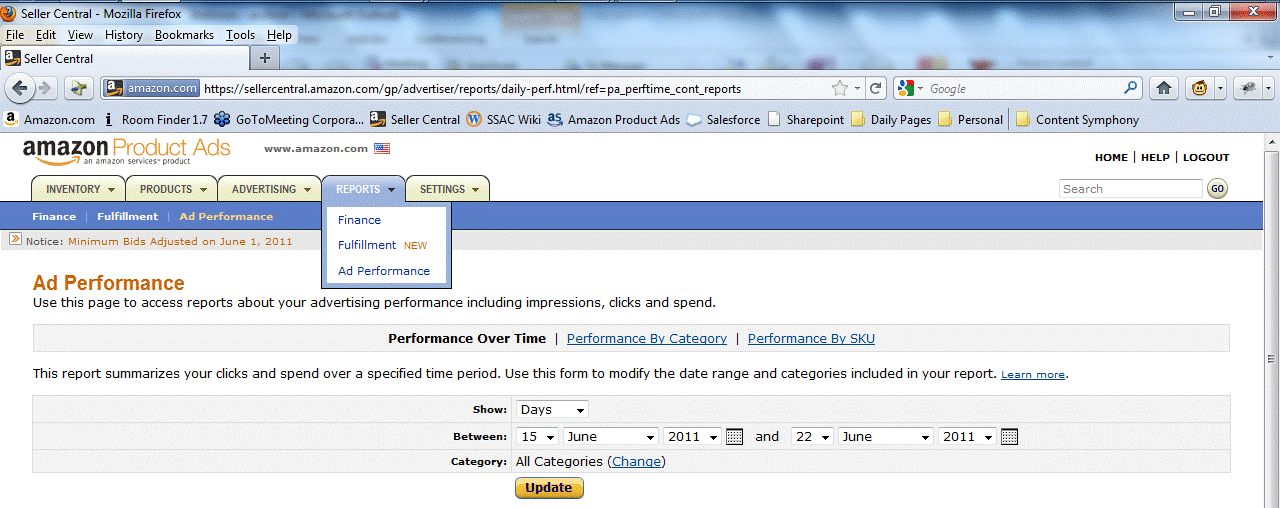
Another addition to the Reports tab is the Finance section, where you can view your Advertising Invoice History and your invoices, including all charges and credits on your account.
Q&A
Q. How can I make my products searchable?
A. The best way to make your products searchable is to add a UPC or a MPN. Although UPCs and MPNs are not required for your product listings, we recommend that you include them, since they are used to match your products with existing detail pages, or to create unique pages on Amazon.
|
|
|



